
Supporting Children Who Struggle with Reading and Writing With a Google Workspace extension, Find the Right Learning Approach for You with Google Workspace Extensions
9/24/26
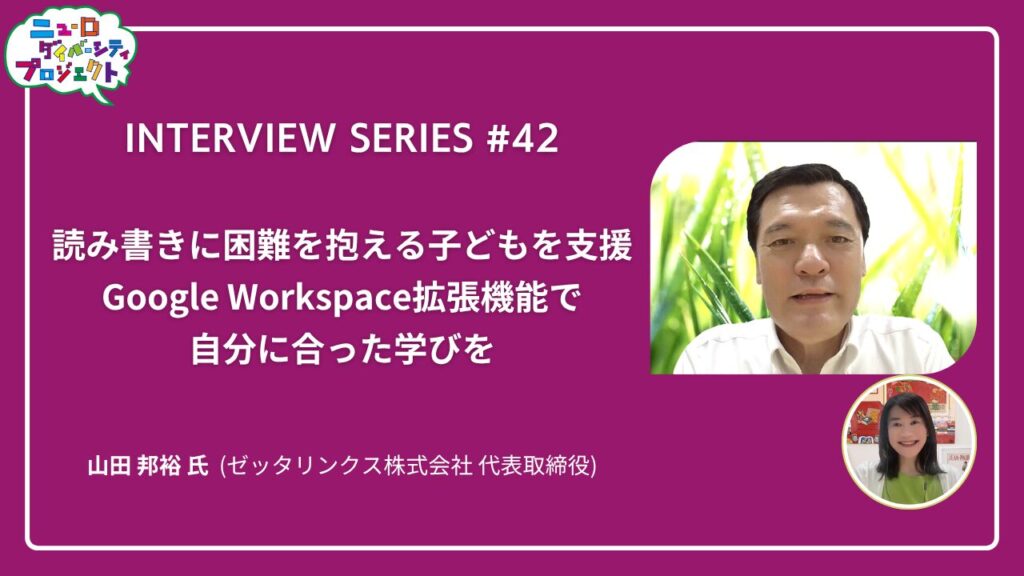
The “Neurodiversity Project,” organized by B Lab, aims to respect brain and neurological diversity and create a society where everyone can thrive as their true selves.In this installment of the Neurodiversity Project interview series, we feature the initiatives of Zetta Linx Inc., which will be exhibiting for the first time at the 2026 “Everyone’s Brain World” event. The company provides extensions for Google Workspace—used in classrooms—to support children who struggle with reading and writing, helping each student achieve a learning experience tailored to their individual needs.Nanakko Ishido (▲Picture 2▲), Director of B Lab, spoke with Kunihiro Yamada (▲Picture 1▲), CEO of Zetta Linx Inc., about the company’s exhibition at “Everyone’s Brain World” and its future initiatives.

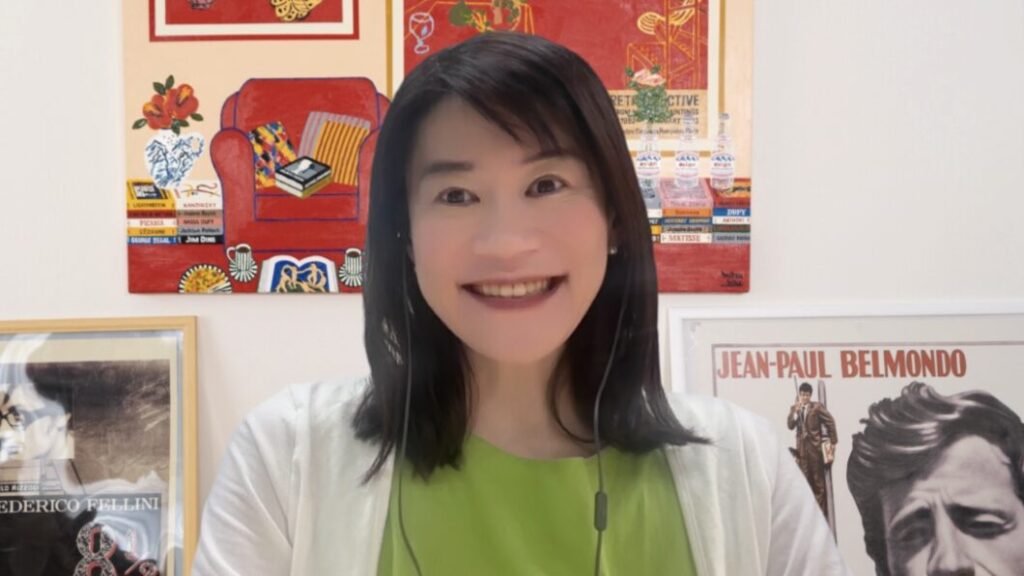
>> The interview video is now available!
To make learning easier for children
Supporting the creation of an environment where ICT can be easily utilized
Ishido: “We’re joined today by Mr. Yamada from Zetta Linx, who is participating in ‘Everyone’s Brain World’ for the first time. Please tell us about your exhibit at ‘Everyone’s Brain World’ and the services your company typically provides.”
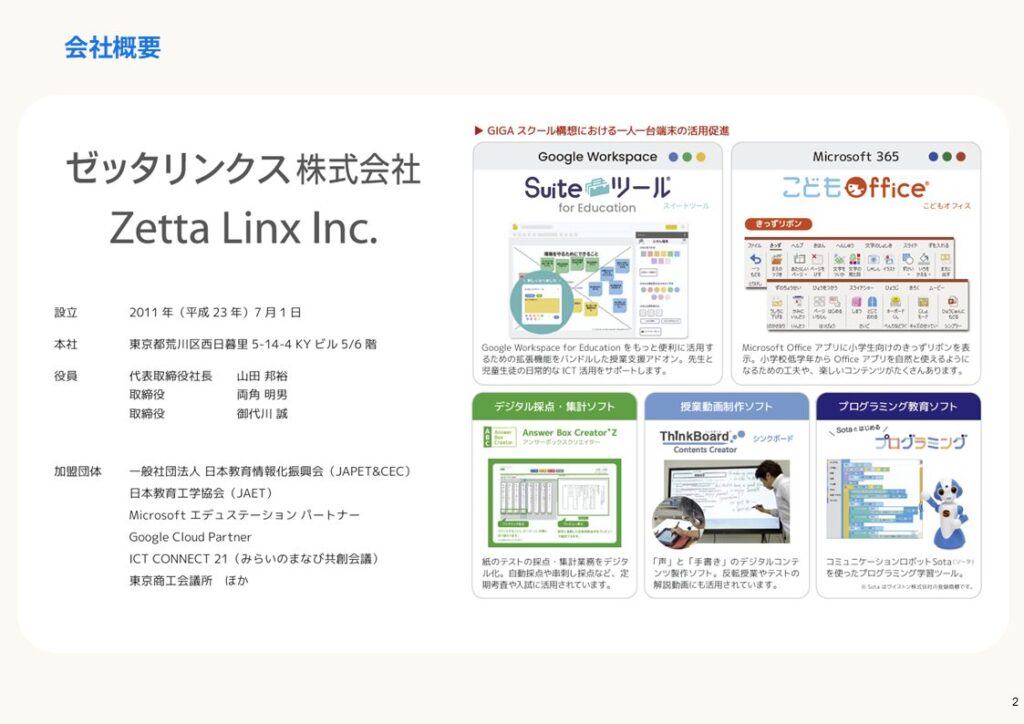
Mr. Yamada: “Zetta Linx is a company that has been in business for 15 years, specializing in the development of ICT teaching materials and software for schools and educational institutions. In recent years, the GIGA School Initiative has driven the rollout of one device per student in elementary and middle schools, with Chromebooks being particularly widely adopted. Our company provides extensions for Google Workspace designed for use on Chromebooks.”
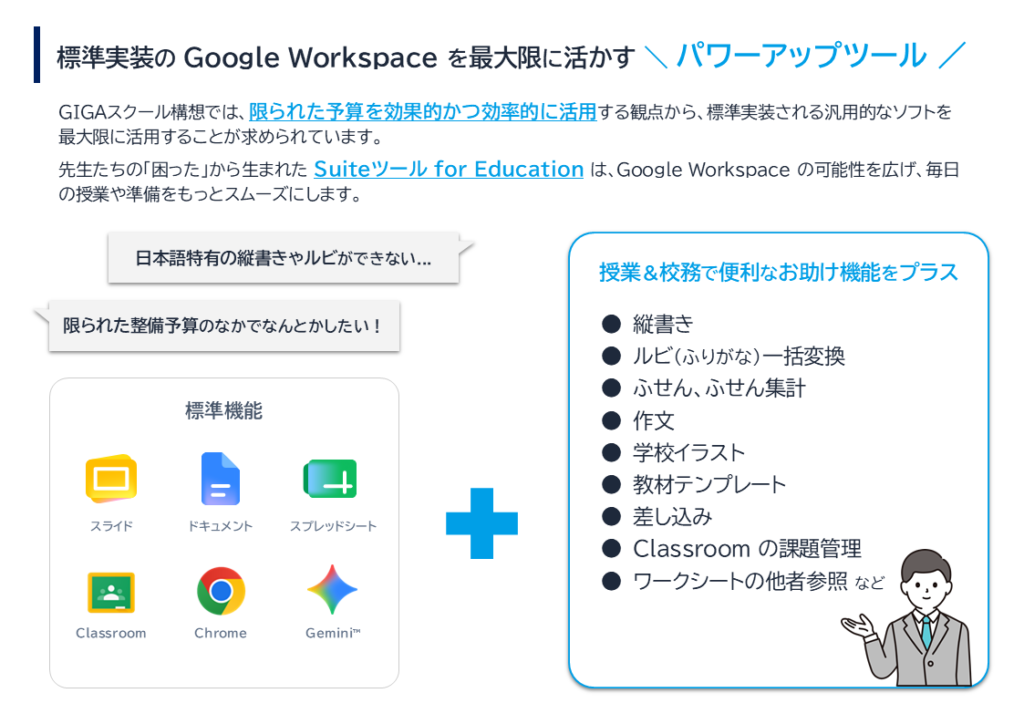
Since Google Workspace is a service developed overseas, there are areas where it does not fully support features specific to the Japanese language, such as vertical writing and ruby text. Therefore, our company has developed extensions that enable the use of vertical writing and ruby text, and we provide these to schools. Furthermore, by applying this technology, we also offer features designed to support the learning of children with dyslexia (a developmental reading and writing disorder).For example, by adding furigana to text or displaying text on web pages with word breaks, we help create an environment where children can read more easily and make better use of ICT.
One of our flagship products is the “Suite Tool.” (▲Picture 3▲)

For example, we are developing extensions for Google Workspace, as well as features that provide tools to help children become proficient in using Microsoft Office. (▲Picture 4▲)
Since the built-in features for Google Workspace do not fully support Japanese-specific features such as vertical writing and ruby text, we offer an extension. (▲Picture 5▲)
You can use an extension to convert text written horizontally into vertical text. (▲Picture 6▲)
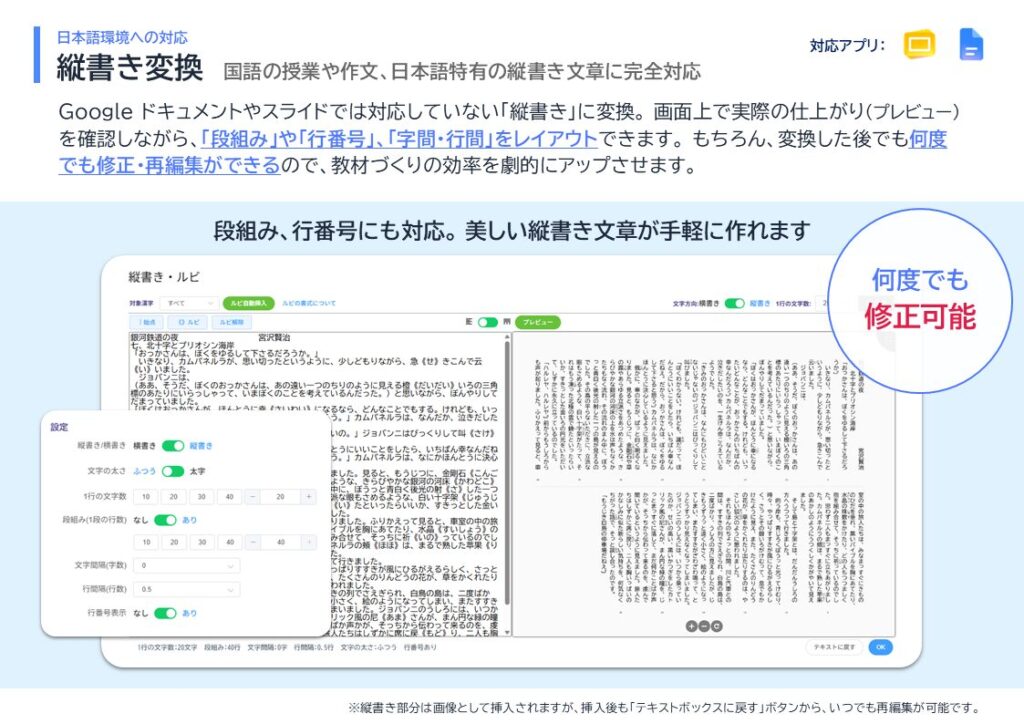
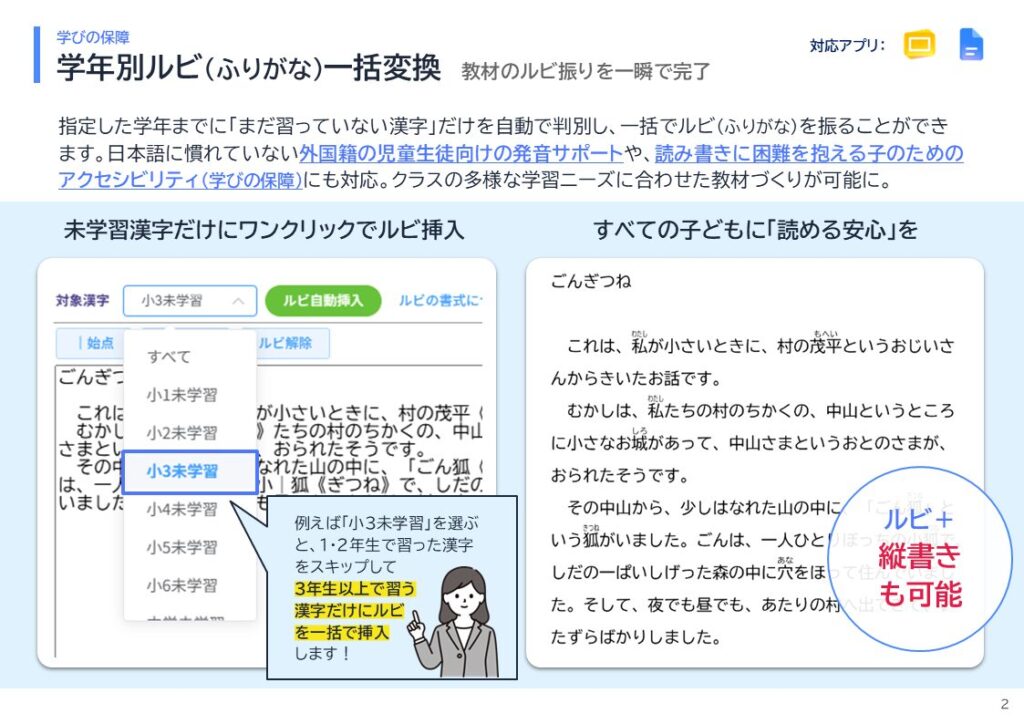
By using the feature to batch-convert furigana by grade level, you can, for example, omit furigana for kanji learned up to the third grade of elementary school while adding furigana to kanji learned after that, and display the text in vertical orientation. (▲Picture 7▲)
Furthermore, you can export your work to Google Slides. For example, when you want to create long messages or practice questions for a Japanese language class, you can set the text to vertical orientation and leave keywords blank to create fill-in-the-blank exercises. Since you can also create multi-column layouts, you can format long texts into columns and adjust line spacing and character spacing to create classical Chinese texts.
Features such as text segmentation on the website, etc.
Provides various features to support teaching
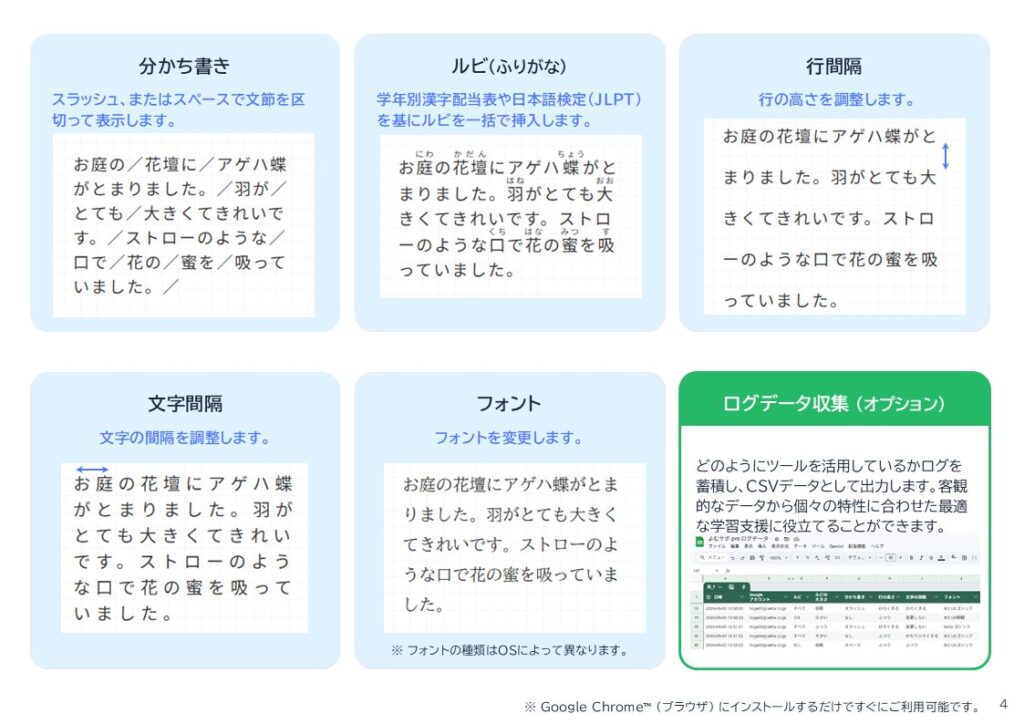
We’re also developing a feature called “Yomu-Sapo” that makes websites easier to understand and read. (▲Picture 8▲)
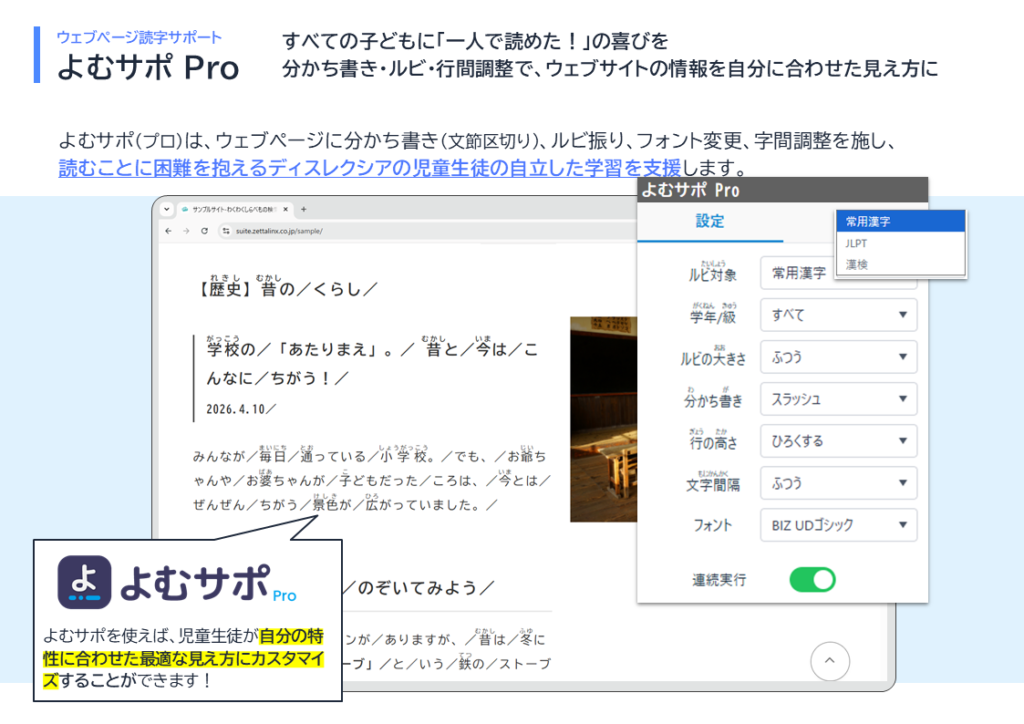
For example, by setting the system to display ruby text only for kanji used in third grade and above, and using word separation, you can insert spaces or slashes between phrases to make the text easier to read. (▲Picture 9▲)
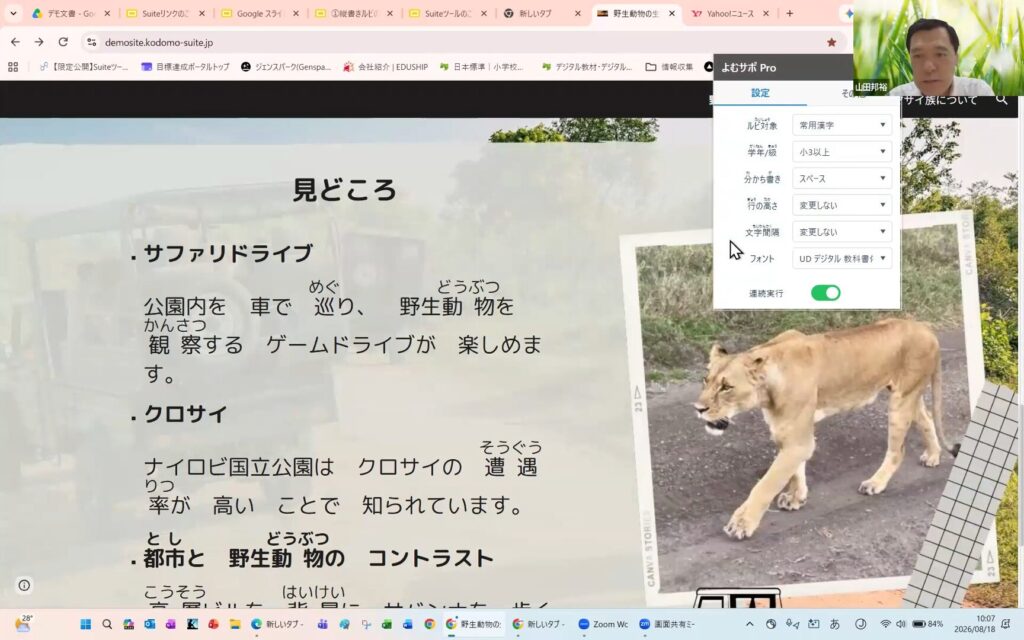
When you use this feature on sites like Yahoo! News, it breaks the text into phrases, making it easier to read. This allows even children who struggle with reading—including those with dyslexia—to browse websites. In schools, this tool is used to help students read web pages and conduct research.Children can also customize the settings to make reading easier for themselves, such as changing the phrase separators from slashes to spaces, or increasing line spacing and character spacing.
In addition, “Yomu-Sapo” includes a feature that allows teachers to track the children’s activity logs. This enables teachers to see which children are viewing the website and under what settings, allowing them to provide individualized instruction based on an understanding of each child’s unique characteristics. (▲Picture 10▲)
Among the features that can be used during collaborative learning and research-based learning, we also offer a feature called “Sticky Note Tally.” (▲Picture 11▲)
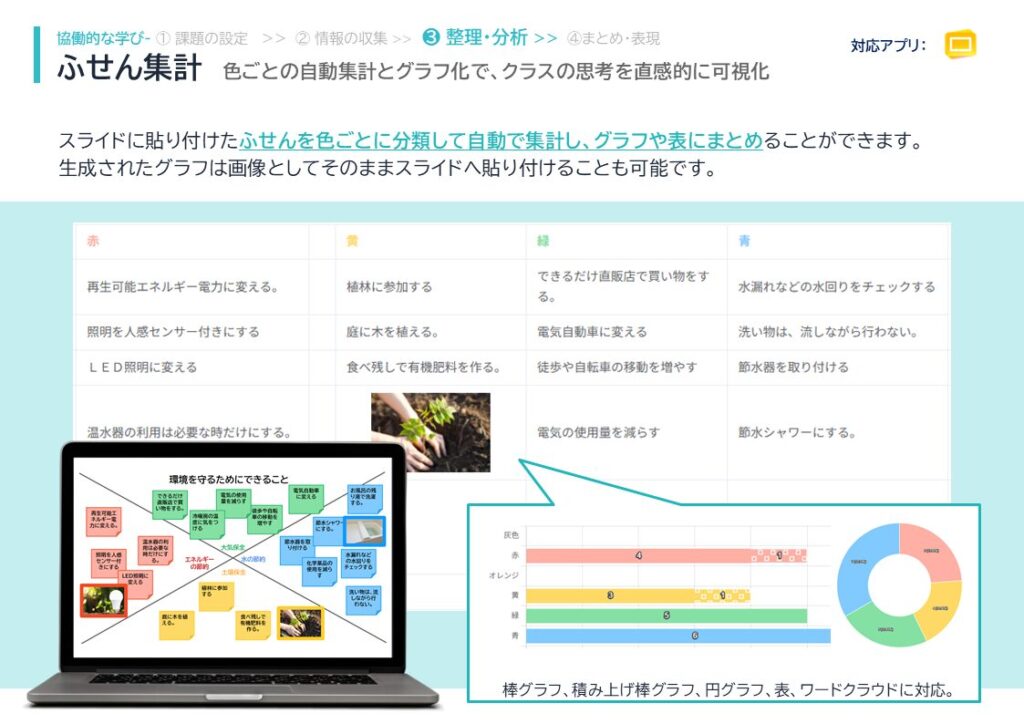
When conducting research-based learning, you may sometimes attach sticky notes to the information you’ve gathered. This tool can automatically tally how many sticky notes of each color you’ve attached and display the results in a graph. (▲Picture 12▲) (▲Picture 13▲)
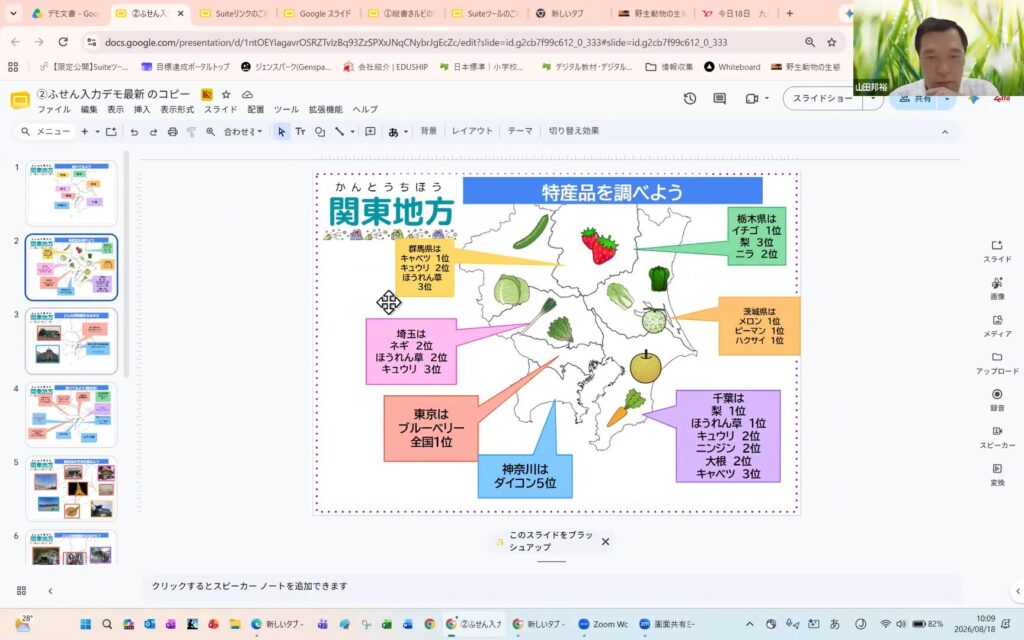
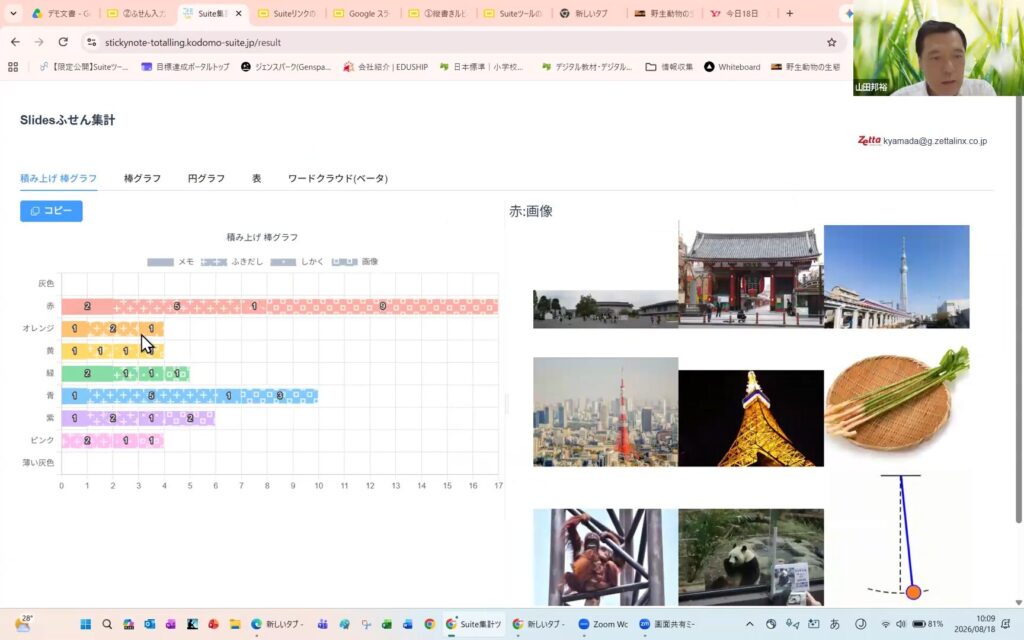
When you plot the data on a graph, you can see at a glance which color of sticky notes appears most frequently, allowing you to identify trends in the information you’ve gathered. You can also create bar charts or pie charts, or use a word cloud to see which words appear most often. This tool lets you summarize your research project in a variety of ways.
In this way, while taking into account the various feedback we receive from teachers, we provide add-ons and tools designed to make it just a little easier to incorporate ICT into classroom instruction.
And one more thing. Finally, I’d like to introduce a feature called “Simple Menu.” (▲Picture 14▲)
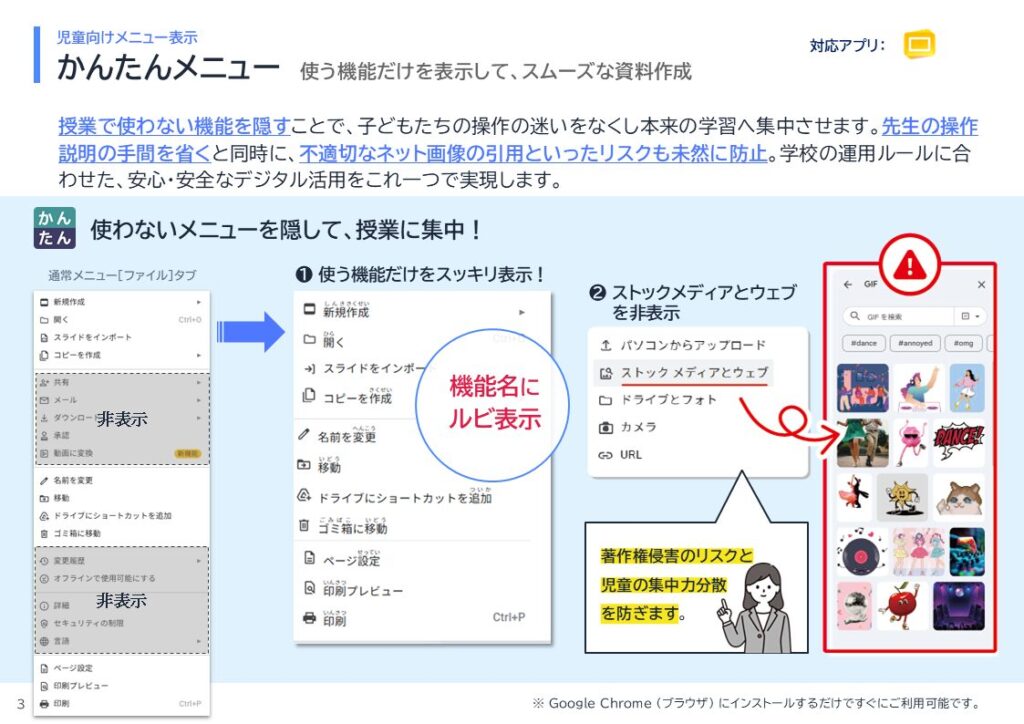
Since various tools, such as Google Workspace, aren’t necessarily designed for children, their menus can be complex and difficult for them to understand, and they often contain many unfamiliar words and terms. Children frequently get confused about how to use these tools during class, but when they use the “Simple Menu,” only the features they actually need are displayed. When you turn on the Simple Menu, furigana (pronunciation guides) are first added to the menu items.Furthermore, unused features are hidden, and only the necessary ones are displayed. If you set the menu to its simplest configuration, only the essential features appear—meaning you can’t even insert shapes—allowing students to focus solely on typing text. “In this way, we provide features that enable children to use ICT with confidence in school settings.”
“Reading Difficulties” That Are Hard to Notice on Your Own
Using ICT to Connect Students with Appropriate Support
Ishido: “Thank you very much. Personally, I’m currently focusing my efforts on neurodiversity initiatives, but beyond that, since around 2005, I’ve been advocating for the creation of a learning environment where every student has their own device. I’ve also been involved in initiatives like the digital textbook movement aimed at introducing these devices. That’s why I found Mr. Yamada’s remarks particularly fascinating.Personally, I view the establishment of a one-to-one device environment as the infrastructure necessary to provide individually optimized reasonable accommodations for all children. The service that you and your team provide is also, in essence, a service that serves as the infrastructure for realizing a learning environment tailored to each individual. I was deeply impressed.”
At the “Everyone’s Brain World” exhibition, will you be introducing features and services that focus on creating the optimal “reading environment” for children with dyslexia?“It’s said that in a class of 30 to 40 students, there are typically about two or three children with dyslexia. Based on your experience providing this service, what kind of feedback have you received from teachers, students, and parents?”
Mr. Yamada: “Children with dyslexia also have a wide range of individual characteristics. The solutions we offer may not be a perfect fit for every single one of them. We really need to do a better job of identifying a wider variety of needs.We aim to provide ‘what ICT makes possible’ while adapting to individual characteristics. Specifically, while we currently use slashes to separate syllables, there are various requests—such as separating them by color or adding underlines. Although it may be difficult to accommodate every single request, we want to enable children to customize their learning environment themselves so that they can create materials that are easy for them to read.”
Ishido: “Thank you. What inspired you to start a service that supports children’s reading?”
Mr. Yamada: “Originally, we were providing a furigana feature to schools. While doing so, we heard from teachers that some children found it difficult to read unless the text was broken down into word segments—not just with furigana alone. Since furigana can be added to each phrase, we realized that inserting spaces there would allow for word segmentation, and that’s how it all started.We’d also heard that for foreign children just starting to learn Japanese, it’s actually much easier to read when the text is broken down into phrases, so we’re currently considering whether we can offer this feature to those children as well.”
Ishido: “As I listened to your talk, I found myself thinking that breaking text into phrases makes it easier to read, and that this might be the reason many children come to love books. On the other hand, returning to the topic of dyslexia, I recognize that it is not yet fully understood by society.Please tell us how you perceive the current situation facing people with dyslexia—both in Japan and overseas—and what your understanding of it is.”
Mr. Yamada: “There is little information available regarding the situation overseas, so I don’t know the exact details. Here in Japan, I’ve been attending various workshops and seminars led by experts to gather information on dyslexia. Based on that, I feel that schools are finally beginning to understand the condition and are gradually making accommodations.”
Ishido: “What are the reasons and circumstances behind children’s difficulties with reading? Could you also tell us what kinds of support and solutions are available for each of these challenges?”
Mr. Yamada: “From the perspective of children who struggle with reading, I suspect there are surprisingly many who aren’t even aware that reading is difficult for them—they simply think they’re not making much progress in their studies or that they might lack the ability to think critically.Teachers often fail to notice these children as well. I’ve heard that in such situations, it’s often only after they experience something—such as finding that they can read much faster when a webpage is broken down into short phrases—that they first realize their own learning characteristics. It’s quite difficult to diagnose this, and it’s certainly even harder for children to diagnose their own characteristics on their own. We hope to provide tools that can help teachers be more attentive and serve as a catalyst for recognizing these issues.“We’re working to provide features and tools that will allow teachers to recognize within their own classrooms that ‘while that child reads a bit slowly, they can actually keep up if we use these strategies.’”
Ishido: “From that perspective, wouldn’t it be entirely feasible to use ICT to collect data on how children actually read, analyze that data with AI, and automatically provide reading methods tailored to each individual? Have you already given any thought to that approach?”
Mr. Yamada: “I think it would be wonderful if we could offer this service while working closely with experts.”
The use of ICT in schools and classrooms
still in its early stages
Ishido: “I believe that, in the future, advances in various technologies will enable us to provide even more support than ever before to children who struggle with reading or find it difficult. For example, there are features that read text aloud. When I think about it that way, I don’t think that ‘learning to read’ is necessarily the only goal. What are your thoughts on this, Mr. Yamada and colleagues?”
Mr. Yamada: “First, regarding text-to-speech features, since they are often built into computer operating systems (OS) and are also available on smartphones, I’ve been hearing more and more lately that children who struggle with reading are making use of these features.However, in the real world, it is important not only to listen and understand but also to read text with one’s own eyes. We hope to provide services from that perspective.”
Ishido: “I believe the service was originally launched with the intention of being used in the classroom, from the perspective of supporting children during lessons.On the other hand, I thought that the features you mentioned earlier—such as adding furigana to web pages and automatically splitting words—could support children who struggle with reading not only at school but also in their daily lives at home. With that in mind, I’d like to ask about the future direction this service is aiming for. How far do you plan to expand it going forward?”
Mr. Yamada: “If the furigana and word-separation features were available not only on the website but also in PDFs, for example, children who struggle with reading would be able to read more text. We are currently considering adding PDF support. Many of the notices distributed by schools are in PDF format. Some educational materials are also provided as PDFs.I believe that if we could add furigana and word segmentation, texts would become much easier to read. Of course, text-to-speech is available, but since information is absorbed at the speed at which it’s read aloud, I think it has slightly different characteristics from the cognitive process of reading and understanding text with one’s eyes. I still believe that reading text with one’s eyes is essential.”
Ishido: “In your view, how far has the use of ICT progressed in creating learning environments tailored to each individual? And given the advancements in technology, how much further do you think we’ll be able to go in the future? Please share your vision for what the future holds.”
Mr. Yamada: “I believe we’re still just at the beginning. However, compared to the paper textbooks of the past, I think it’s clear that ICT has opened up a wide range of possibilities. As a result, I expect we’ll see a variety of new learning styles emerge. While new ICT technologies—such as AI—will continue to emerge one after another, I hope that rather than simply relying on them, children will be able to use them freely to further their own learning. I believe the real potential lies ahead.”
Ishido: “Thank you very much. Earlier, we heard that teachers are gaining a deeper understanding of these issues in the classroom, and with technologies like the ones introduced today emerging one after another, I feel that learning in schools is truly undergoing a period of transformation.”
On the other hand, given the current trend of increasing numbers of children who are not attending school, I suspect there are some children who are struggling to cope with daily life or find it difficult to learn, as these changes have not yet fully reached them. From your perspective as a provider of services to schools, how would you like to see schools and school boards change moving forward?Also, if there are any specific areas where you feel, “If this were changed, we could provide a better learning environment,” please be sure to let us know.”
Mr. Yamada: “While there are teachers who are truly pioneering and schools with cutting-edge initiatives, there are still many schools that are not. This is true of government agencies and parents as well—there’s inevitably a tendency to follow the crowd, which tends to hold back those who are leading the way.I believe it’s important to enable progressive schools to advance even further. At the same time, there are schools that struggle to keep up due to disparities, so as private-sector operators, we aim to play a role in effectively lifting those schools up and supporting them. I hope that a system will naturally emerge where the community—including local residents and businesses—provides support centered around the schools.”
Personalized Learning
To truly embed it in the classroom
Ishido: “Earlier, you mentioned that you want to continue listening to user feedback moving forward. Could you share any examples where, by observing how children actually use the product and seeing their reactions, you realized, ‘This is the feature we needed,’ leading to new discoveries that resulted in new features or services? Also, I’d really like to hear about any features that, despite user feedback and demand, have not yet been implemented.What do you think?”
Mr. Yamada: “We’ve developed an essay-writing feature this time. (▲Picture 15▲)
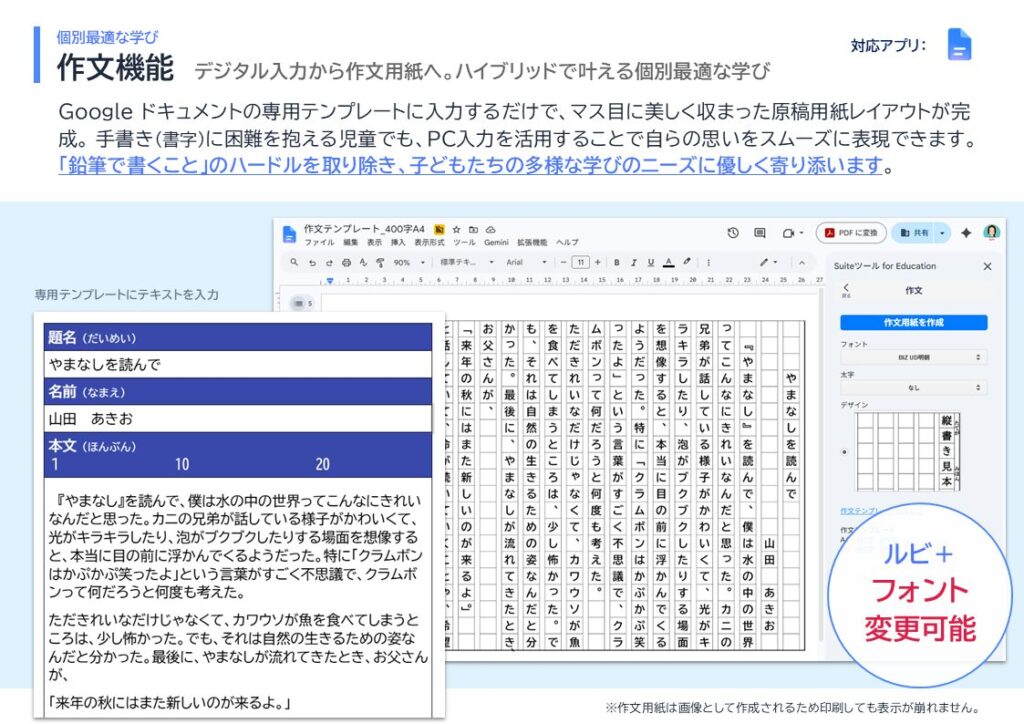
This is a feature that transfers typed text onto composition paper. Unlike dyslexia, there are also children with dysgraphia (a writing disorder). While they can write sentences properly when typing, they feel uncomfortable writing by hand, making it difficult for them to complete writing assignments.I heard stories about children who, when given summer homework assignments, couldn’t write essays by hand but could write exactly what they wanted using a computer. I reasoned that if they could type their text and then print it out on lined paper for submission, they would be able to complete their essay assignments just like other children, so I developed this feature.“Some might suggest that they could simply type on a computer and submit the text as a horizontally formatted word-processed document, but from the children’s perspective, they want to hand in their homework on composition paper, just like their classmates. We wouldn’t have known that the children felt this way—or that there was a need for this feature—until we actually tried it.”
Ishido: “By actually providing these services, have you observed any changes or positive effects—such as an increase in the amount children read or write, improved grades, or a more proactive attitude toward classwork? Also, have you collected any data on these results?”
Mr. Yamada: “We’re still having a hard time gathering feedback directly from the children. We do hear about their experiences from the teachers, but we haven’t been able to collect any quantitative data yet. In that regard, the reality is that we’re still limited to local-level approaches.”
Ishido: “I heard there have been some reactions from the teachers—what kind of feedback have you actually been getting?”
Mr. Yamada: “I’ve heard people say that they’re spending more time on their computers and that they’re able to make better use of them in class.”
Ishido: “What do parents have to say?”
Mr. Yamada: “It’s been difficult to gather feedback and impressions so far. Getting input from parents is surprisingly challenging. One of the reasons we decided to exhibit at ‘Everyone’s Brain World’ this time was that we wanted to hear feedback directly from parents. We’ve been hearing the children’s thoughts through their teachers, so I hope ‘Everyone’s Brain World’ will serve as an opportunity to do that.”
Ishido: “I’m really glad to hear you think that.On the day of the event, many parents and children will be attending, so I think you’ll be able to experience their reactions firsthand and observe them up close. Listening to you today, I’ve come to clearly understand that what you and your team at Yamada are providing isn’t just a tool for children who need support—it’s a feature that’s easy for all children to use, and that you’re striving to create an environment where each individual can learn in a way that suits them best.Finally, I’d like to wrap up by asking you to share your vision for the kind of society you hope to build beyond realizing optimal learning for each individual.”
Mr. Yamada: “I would be very happy if our tools could play even a small part in helping to truly embed personalized learning in classrooms, make it the norm, and create a society where that is the case.Establishing this in classrooms is a painstaking process. We must move forward step by step, working in collaboration with teachers. We intend to maintain that commitment, support the teachers, and continue our efforts.”
Ishido: “Everyone has a different way of learning, and everyone’s cognitive characteristics are different. We design learning environments based on that premise. I believe that what lies ahead is not a society that requires ‘special support,’ but rather a society where everyone can learn in a way that suits them and reach their full potential in their own way.I felt that the services Mr. Yamada and his team provide align perfectly with the vision that ‘Everyone’s Brain World’ is striving to achieve. Thank you very much for today.”